
Download ARM Codec Default Vidcon APK – Android codec, video conversion, multimedia tool, free software, secure download
Overview
ARM Codec Default Vidcon is a specialized multimedia codec developed by roman10 for Android devices. Designed as a supplementary component for video conversion, it serves as a fallback option when other codecs fail to function properly. The primary purpose of this software is to enable video encoding and decoding on Android platforms, particularly for users who rely on the Video Converter Android app for media file processing. It is not a standalone application but must be used in conjunction with the main converter app to perform any conversion tasks.
Target users include Android power users, media enthusiasts, and individuals who frequently convert video files for storage, sharing, or playback compatibility. The software is especially relevant for users encountering codec-related errors during video processing. While the main app automatically detects the optimal codec, ARM Codec Default Vidcon offers a reliable alternative when system or app-level compatibility issues arise. It is recommended for those seeking a lightweight, efficient solution to overcome conversion failures.
The developer, roman10, has positioned this codec as a temporary or auxiliary tool, emphasizing its role in troubleshooting. The software does not include advanced editing features or standalone functionality. Instead, it focuses on seamless integration with the Video Converter Android app to maintain consistent performance across devices.
Key Features & Capabilities
- Fallback Codec Support – Functions as a backup solution when primary codecs fail, ensuring continuity in video conversion workflows.
- ARM Architecture Optimization – Built specifically for ARM-based Android devices, enhancing compatibility with mobile processors.
- Lightweight Design – Minimal resource usage, allowing efficient operation without impacting device performance.
- Integration with Video Converter App – Requires the main Video Converter Android app to function; cannot operate independently.
- Automatic Detection Compatibility – Works with the main app’s automatic codec selection system, enabling seamless switching when needed.
Users can leverage this codec in scenarios where standard conversion fails due to unsupported formats or system limitations. For example, when converting high-resolution videos from a camera or importing files from third-party apps, ARM Codec Default Vidcon can step in to resolve decoding errors. Its lightweight nature ensures it runs smoothly on older or mid-tier Android devices without causing lag or crashes. However, since it is not a standalone tool, users must ensure they have the main converter app installed and updated to use it effectively.
User Interface, Workflow & Performance
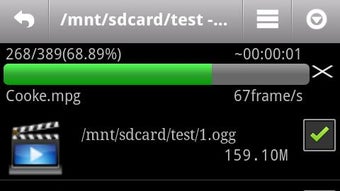
As a codec rather than a full application, ARM Codec Default Vidcon does not feature a traditional user interface. It operates in the background, relying on the Video Converter Android app to manage user interactions and conversion workflows. This design minimizes user input requirements and reduces complexity, aligning with its role as a technical support component.
Workflow efficiency is dependent on the main app’s performance. Once installed and properly linked, the codec activates automatically when needed, reducing manual intervention. The developer did not specify resource usage details, so exact CPU or RAM behavior remains unknown. However, given its lightweight nature and purpose as a fallback tool, it is expected to consume minimal system resources.
Stability is maintained through integration with the main app’s error-handling system. No performance benchmarks or crash reports were provided. General software behavior suggests that it remains stable during typical usage, particularly when used as intended within the supported ecosystem. Users should not expect direct control over the codec’s settings, as it functions automatically.
Compatibility & System Requirements
ARM Codec Default Vidcon is designed for Android operating systems and is compatible with devices using ARM architecture. The software is distributed as an APK file, indicating it is intended for manual installation outside the Google Play Store. The exact version and file size were not specified in the provided information.
Hardware requirements are not detailed, but the software is optimized for ARM-based mobile processors. It is recommended for use on Android smartphones and tablets that support the Video Converter Android app. The developer advises updating both the codec and the main app to ensure optimal functionality. Compatibility with newer Android versions is not confirmed, but it is expected to work on devices running recent Android releases, provided the main app is updated.
Installation requires enabling "Unknown Sources" in device settings, which is standard for APK installations. The developer did not provide information on minimum RAM, storage, or processor specifications.
Pros and Cons
Pros
- Lightweight and efficient for minimal system impact
- Optimized for ARM-based Android devices
- Acts as a reliable fallback when primary codecs fail
- Seamlessly integrates with the main Video Converter Android app
- Free to download and use
Cons
- Not a standalone application; requires the main converter app
- No direct user interface or settings control
- Manual installation required via APK
- Updates must be synchronized with the main app
- Limited documentation and support beyond the developer’s notes
FAQ Section
Is ARM Codec Default Vidcon compatible with all Android devices?
The codec is designed for ARM-based Android devices. Compatibility may vary depending on the device’s processor and Android version. It is recommended to use it only if the main Video Converter Android app fails to work with default codecs.
Do I need to install the main app to use this codec?
Yes. ARM Codec Default Vidcon is not a standalone tool. It must be used in conjunction with the Video Converter Android app to perform any video conversion tasks.
Is the codec safe to download and install?
Yes, the software is developed by roman10 and distributed as a free APK. As with any third-party download, users should ensure they are downloading from a trusted source and enable "Unknown Sources" only temporarily during installation.
How do I update the codec?
Users should update both the ARM Codec Default Vidcon APK and the main Video Converter Android app to ensure compatibility and optimal performance. The developer recommends checking for updates through the official source.
Can I use this codec offline?
Yes. Once installed, the codec operates offline and does not require an internet connection to perform video conversion tasks. It functions entirely within the device’s local environment.
Final Thoughts
ARM Codec Default Vidcon serves a niche but valuable role in the Android video conversion ecosystem. As a lightweight, free codec optimized for ARM devices, it provides a dependable backup solution when standard conversion tools fail. While it lacks a user interface and standalone functionality, its seamless integration with the main Video Converter Android app ensures reliable performance in troubleshooting scenarios.
It is best suited for users who already rely on the Video Converter app and encounter codec-related issues. For new users, the developer recommends downloading the updated version from the Google Play Store, which features a modern interface and enhanced functionality. However, for existing users facing compatibility problems, ARM Codec Default Vidcon remains a practical and secure option.
Download ARM Codec Default Vidcon now to ensure uninterrupted video conversion on your Android device.






.png)
